Compliance or Investment? Arguing the Case for Ergonomics Projects

May 29, 2013

[This article was first published in Health & Safety Matters magazine, May 2013]
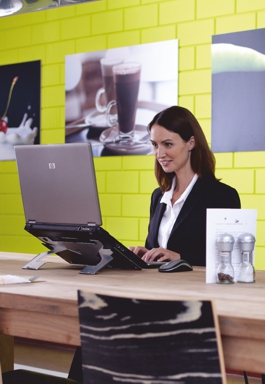
Cafe working

Cafe working

It seems to me there are two ways of thinking about the funding of workplace ergonomics and it is essential to identify which of these two modes applies to your employer (or client). Unless you do so, you may be wasting time and energy by approaching issues the wrong way.

“Compliance Mode” applies to organisations that accept their obligations but are not motivated to spend beyond the demands of minimum compliance.  They will do what they must in order to remain within the law but regard these commitments simply as unavoidable costs. And the way we all respond to costs is to make every effort to minimise them.

By contrast, “Investment Mode” applies to organisations which regard ergonomics (probably alongside health and wellbeing) programmes as investments in the business.  Their approach recognises that investing in the education, comfort, posture, health and fitness of the workforce will result in improved productivity to the benefit of the business as a whole.  Their focus will be to identify the return on that investment.

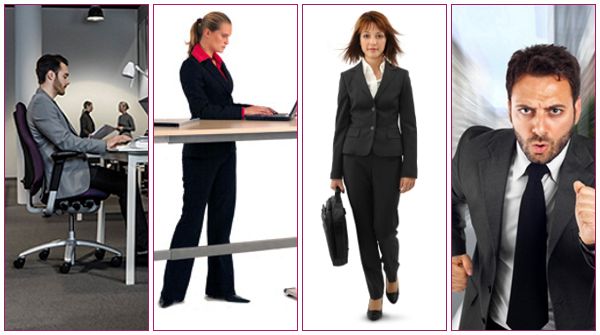
Sit-stand working

Sit-stand working

Clearly, these two modes are not absolutes and commercial pressures and available resources will also impact how an employer responds to any individual project.  However, my experience is that there will be an overriding culture within an organisation that will generally lean in one of these two directions which are, by definition, divergent views.

It is equally important to understand whether employees in the business actually share the organisational culture as it is publicly portrayed. If employees sneer at corporate initiative posters or make comments such as “they say that but …” about declared organisational intentions, there is clearly misalignment.  Other tell-tale signs of disparity in conversations with managers are expressions like “I hear what you’re saying but…” or references to “expectation management”.

“Engagement” is a word that frequently appears in discussions about getting buy-in for ergonomics, health & safety or wellbeing programmes and the level of staff engagement is frequently a good indicator about the organisational culture.  If personnel genuinely believe that their employer cares about their wellbeing, they probably work for an “Investment Mode” employer.

Dealing with Compliance Mode employers is a simple, if unfulfilling, process.  Conversations will be short-term by nature and the focus is on price.  Such organisations are not interested in medium-term returns and will, typically, buy a cheaper product even if it will have a disproportionately short life expectancy. Personnel in such organisations frequently do not see their own future in the business as long-term and, as such, are not concerned about considering the impact of a project too far into the future.
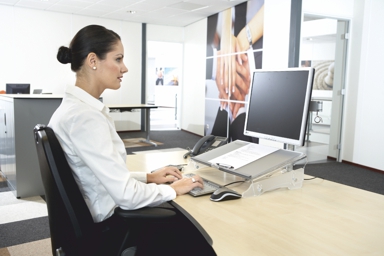
Hot desking

Hot desking

Investment Mode organisations are much more rewarding to work with but project acceptance should still not be taken for granted.  It is important to be properly prepared and ensure proposals are suitably focussed. Here are some ideas to achieve success:

  • Do your research. Ensure that you understand the objectives of the project and ensure your proposal matches them.  For example, if you are trying to improve the ergonomics of home-workers, is the question about the furniture or laptop use or the need to carry equipment around? (It’s probably all three!).  Remote working also raises major communication and training issues so it is important, not just to provide the right equipment, but to demonstrate how training and monitoring can be implemented.
  • Do not ignore the ancillary considerations. How important is the look of the product?  If the project relates to a new, state-of-the-art building, how will your proposal fit into the surroundings.  Often the adjustability and personalisation espoused by ergonomics may conflict with the architect’s vision.  All those individually set electric sit-stand desks will play havoc with the clean lines of the new open-plan design!
  • Are there other areas of the business where cost savings could be made as a result of this project?  For instance, buying laptop stands with a keyboard and mouse may save the purchase of docking stations and/or extension monitors.
  • Are there other ongoing projects or issues that this project would support.  What are the priorities of the Occupational Health or Wellbeing teams at the moment?  Speak to these departments as well as HR and IT in case there are mutual benefits.
  • Are there any other current initiatives that can be aligned to the project brief?  Is absenteeism, presenteeism or employee fitness a current focus?  How might your project help to improve these?
  • Are there any broader corporate objectives that you can include in your proposal? For example, what is the organisation’s position on sustainability?  How does it implement its CSR policies?  Often products promoted by ergonomics companies have a good environmental story that will align strongly with the corporate philosophy of an Investment Mode employer.

Finally, ensure you present a coherent financial case.  Remember that it’s the return on the investment that will ultimately win the argument.


Active desks – a step too far?

April 10, 2013

LakeDistrictViewApple crumble & custard. Morecambe & Wise. Long walks & the Lake District. Some combinations just work well together.

Other pairings may be worthy individually but less so when united. I would put driving & texting, Rachel & Joey, walking & typing, and cycling & mousing into the latter category.

Treadmill DeskRecent discussions and headline-grabbing stories about the adverse effects of long-term sitting have brought “active desks” back into the limelight. (Active desks provide the user with facilities to walk, cycle or even use a recumbent elliptical trainer when working at an appropriate height desk). I first saw these at an exhibition in the US several years ago and, despite the plausible sales pitch, I was sceptical from the outset.

My issue with these products is that, like physio balls and kneeling chairs before them, their application in the workplace can be misunderstood and, as a result, misapplied.

Walking and other forms of exercise are obviously “a good thing” but how can you combine this effectively with computer work (which is what the majority of us do at our desk most of the time)?

Passive audio/video activities (webinars, podcasts) are viable with an active workstation – after all, we can watch TV whilst exercising  in the gym. By contrast, typing and mousing require a level of accuracy best accomplished when the upper body is stationary. Productivity will therefore decline significantly. For example, users report dramatic increases in typing errors.

Like physio balls, which are highly effective in their proper context (to strengthen core stability muscles through a proper exercise programme), use in the workplace can be counter-productive or even injury-inducing.

In my view, traditional sit-stand workstations, in combination with other exercise methods, are a better solution (and not just because we sell them!). Not only are they cheaper, they also give the user the opportunity to enjoy a mix of sitting and standing activities throughout the day.  This should always be combined with training and education about other simple activities like stretching breaks, walking meetings, using the stairs, parking at the opposite end of the car park and the many other ways that individuals can improve their health and their productivity without any cost to themselves or their employer.

Car ParkPerhaps my subject should be “Active desks – What’s the point?”

I hope I can look forward to some heated debate about this topic – either online or in person!


Time to Hang Out at the Office?

April 1, 2013
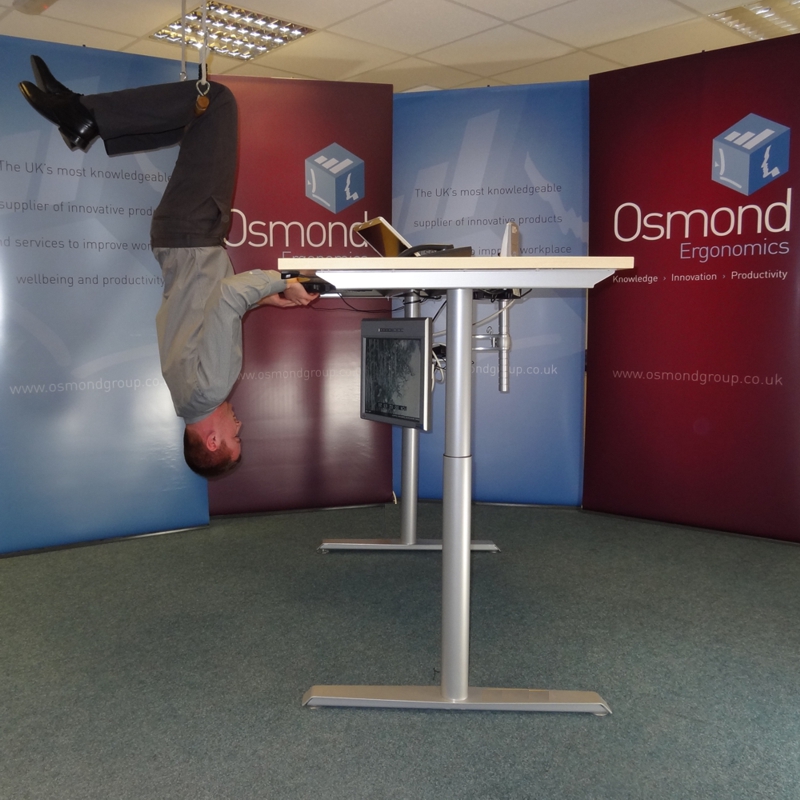
Suspensis Incredulum Integrated Inverted Workstation

The Suspensis Incredulum Integrated Inverted Workstation

We would not normally announce a new product on a Bank Holiday (it’s Easter Monday in the UK) but I couldn’t wait any longer with this news. In fact I couldn’t even wait until noon today!

Working with internationally acclaimed designer & researcher, Rif Loopal, we are delighted to announce the unique Suspensis desk range and, specifically the Incredulum model pictured here.

Rif explains, “The Suspensis Incredulum Integrated Inverted Workstation evolved from my fascination with the debate about sitting and standing at work and the arrival of some radical solutions such as the walking/cycling desks now appearing in the workplace”.

The grey-headed flying fox hangs upside down all day and works night shifts without evidence of musculo-skeletal injury

The grey-headed flying fox hangs upside down all day and works night shifts without evidence of musculo-skeletal injury

He continues, “I have recently spent some time in Australia observing the Grey Headed Flying Fox (Pteropus poliocephalus).  This fruit bat hangs upside down all day without any evidence of adverse effects. Indeed, I have made a number of Google searches for “musculo-skeletal injuries in work-age fruit bats” and found nothing at all. Some may argue that the very healthy fruit-based diet of this creature is a major contributor to its resilience but I would also contend that they work a lot of night shifts, so it’s not by any means an easy life. These experiences inspired me to design this product”

On the basis of his research, Rif has worked with us for several months to create the workstation illustrated here. The benefits are obvious: no slouching, no risk of spinal disk compression and no possibility of cluttering up the work area with unnecessary papers, to name just a few.

A range of accessories will followRif is already working on a range of complementary accessories.  He tells us, “The computer mouse has been the biggest issue – people keep dropping it. The simple and immediate answer (illustrated here) is to use a rollerbar mouse attached to the desk but that doesn’t suit everybody so we are working on a traditional mouse that is helium-filled.  Early field trials suggest that some users may also decide to invest in a crash helmet and some high impact rubber matting”.


How long should an office chair last?

March 25, 2013

ancientofficechairThis excellent question from a recent discussion group raises lots of issues and is, it occurred to me, a great topic for a blog!

The short answer, of course is “It depends”.

The next “rule of thumb” (and incomplete) answer is “Probably up to 7 or 8 years for a chair that comes with a standard 5 year warranty and 12-15 years for a chair that offers a guarantee of 10 years or more”. These life expectancy estimates are not directly related to the warranty period but to the quality of the products to which such guarantees are attributed. If you have a short attention span, you can obviously stop reading here with the question (sort of) answered but there are many contributory factors which will significantly impact the durability and survival of products.

First, these indicative expectations may apply to a majority of products for general office use but there will always be a proportion that don’t stay the distance. Rather like a pair of shoes, an office chair will experience different levels of wear and tear, even where the circumstances look identical.  Chairs used in hot desk environments, in particular, will not be afforded the same sense of ownership and resultant responsibility that would be attributed to a seat used by the same person throughout its life.

Another significant consideration is that events within the business may well make the practical life expectancy of the seating irrelevant. Office relocation, lease expiry, natural churn and smart working initiatives may drive replacement and refurbishment projects more directly than the actual life cycle of the products.

If you are about to buy new chairs …

Take a holistic view of the process.

In addition to the obvious issues such as price, usability, comfort, ergonomics, design, etc., check the warranty period for the products you are considering. As already indicated, warranties should be at least 5 years (in normal office use) but at least 10 years is the norm for better quality products. Also, check the warranty conditions. What is covered? Is there any routine maintenance that is required to ensure the warranty remains valid? Remember that the more expensive fabrics may actually be lighter duty and therefore less hard-wearing.

Consider end of life disposal. Cradle-to-cradle design may be your priority but think seriously about refurbishment options. If the manufacturer offers a rebuild/ reworking service, this can significantly extend the life of the product and may well fit your sustainability (and budget) criteria better than disposal and starting again.

Smart ChairAre you sure you know how many you need? With the growth of smart working programmes, it gets harder to monitor the utilisation of furniture assets. You may need less than you think and, if this is the case, you have greater buying flexibility within your budget.

Never underestimate the importance of ergonomics considerations in chair specification. The better the ergonomics credentials of a product, the greater the likelihood of buy-in from users. And, if they like their chair, they are more likely to look after it and report problems promptly. It is also reasonable to assume that seating designed with ergonomics at the forefront is generally better made and more robust (but the corollary does not necessarily apply!).

If you are reviewing the chairs you already have …

What warranty was provided at the time of purchase and are they still in warranty? Do you have a regular maintenance programme? If not, your original supplier should be able to provide one after an inventory review or, if that’s an issue, the manufacturer will be able to refer you to a reputable operator. If you prefer, they should be able to train your own personnel to carry out any maintenance.

Your DSE assessment cycle should have picked up situations where chair repairs or replacements are needed and tracking the incidence and nature of such situations will give you a good indication of the general condition of the estate. Many manufacturers provide a serial number under the seat so, at the very least, the date of purchase should be easy for your supplier to identify. Our own chairs all carry a 5-digit alphanumeric warranty label which identifies the date of purchase, exact specification and customer order number.

Check with your original supplier or the manufacturer about whether a reconditioning service is available for the products you own. Full reworking may require chairs to be returned to the distributor or manufacturer but, depending on numbers and available space at your location, components such as seat and back pads can often be replaced on site.

Most important of all …

Don’t forget about training your people. Making sure your personnel know how to adjust their chair (and why) not only improves their posture and resultant productivity but regular adjustment keeps chair components functional and identifies malfunctions and breakages promptly. As well as user training at the time of installation, intranet links, handouts and periodic reminders from your DSE assessor team or supplier are essential.

What have I missed? This is a big topic so I welcome, as always, other ideas and contributions.


Office workstations – sit, stand, walk, run?

March 12, 2013

Sit-Stand Desks for Active WorkplacesInternational interest in how much we sit is gaining high profile publicity. Whether we are using a computer, playing video games, driving the car or watching TV, it seems the cumulative effect of so much sedentary (in)activity may be reducing our life expectancy. A quick web search produces related articles from the BBCTIME, the Wall Street Journal and the New York Times to name a few.

With new research about the dangers of prolonged sitting, a greater focus on reducing obesity and some radical products appearing in the market, it seems that sit-stand desks have finally come of age in the UK. In real terms, they now cost about a quarter of the price at which I sold them 15 years ago.  Many U.S. employers are ahead of European companies in sit-stand implementations and, for Scandinavians, sit-stand is already part of the corporate culture.

Whether the motivation is health, ergonomics or productivity (and they’re all intertwined anyway), I am a committed advocate of the use of sit-stand desks – and not just because I sell them! After nearly 10 years using an electric sit-stand desk at work and at home, here are some tips about why they are “a good thing” and how to get the best out of them.

  1. Get some training. In the same way you would expect to be given advice and guidance about how to set up a “standard” seated workstation, your employer (or supplier) should also train you to use the adjustable workstation. You should be confident about how to set it for different activities and how to reconfigure the items on the desk as well as the desk itself.
  2. Mix the use. Change your posture, sit a little, stand a little. Don’t stand all day.
  3. Use other products to enhance the ergonomics further. The desk can’t do it all on its own so think about the ergonomics of your standing work set-up as you would your sitting arrangements. If you’re using  a laptop for any length of time, make sure you have a separate stand, keyboard and mouse. If you’re using a desktop, make sure your screen is at the right height. In either case, think about document management and where to position your ancillary equipment.
  4. Stand up for short meetings. If someone comes to your desk whilst you are sitting, raise the desk to standing height. This is particularly useful if you both need to refer to something on your computer screen.
  5. Make sure all the cables are long enough! Don’t restrict the range of adjustment due to the cables you are using. A set of extension cables will ensure you have unfettered adjustment. You may also want to attach the computer to the underside of the desk to give you easy access and reduce the number of extension cables you need.
  6. Set the desk too high at the end of the day. Before you leave in the evening, raise the desk so that it is too high to use (even when standing).  This will make it easier for cleaners to get under the desk out of hours and force you to reposition it in the morning.
  7. Stand to sort papers. If you’re tidying files, collating papers or preparing for a meeting, it’s easier and more efficient to move around in front of your desk.
  8. Going out later? Take advantage of the opportunity to stand now – you will have plenty of time to sit in the car or a meeting room for the rest of the day.
  9. Popped in to the office at the end of the day? Don’t sit down. You have probably been in the car for hours anyway and you will get more done and get away earlier if you remain standing.
  10. Stand to be assertive. If you’re on the telephone making an appointment or dealing with a difficult caller, you will be more assertive when you’re standing. In the same way that the other party can “hear your smile”, they will sense your confidence. How do you think the expression “thinking on your feet” originated?
  11. Stand to lose weight. Standing burns energy in a way that sitting does not. Standing half the day burns 140+ calories.
  12. Find out more. This excellent booklet by Linak, the component manufacturer, gives lots more information, including exercises you can do at your desk.
  13. Walk away. From a standing position, it’s easier psychologically to take a stroll.  Try “walking meetings” – take a walk around the block instead of cocooning yourself in a meeting room. The combination of walking and fresh air will make the conversation more dynamic, and probably more productive. If, like us, you’re at the end of a cul-de-sac, the point at which your turn around defines half-time for the meeting and it’s amazing how the discussion is complete by the time you get back so the meeting finishes on time.

Agree/disagree? Please comment or call me.

Don’t believe me? Please come and see for yourself.  Our main open-plan office has 13 sit-stand desks and one sit-stand table (used for sorting papers and filing). As I look around me now, there are 4 of us standing and it’s almost unknown for everyone to be sitting. Contact us for an appointment to see what I mean.

Have I missed something?  The title mentions “sit, stand, walk, run” – I shall deal with the “run” issue in a separate blog about “active workstations” (coming soon)!


Ergonomic or Ergonomics?

February 11, 2013

annoyedXXXSmallAm I the only English-speaking person in the sector bothered about the frequent misuse of the word “ergonomic” by people who really should know better? Before I expand this little rant, I suppose I should start by saying “Yes, I have read (and thoroughly enjoyed) “Eats, Shoots and Leaves” by Lynne Truss and I empathise with most of what’s said when I watch “Grumpy Old Men/Women”.  I am also happy to accept that I am quite pedantic about semantics.

But I think there is a serious issue about getting the general public to understand more about ergonomics and I am sure we confuse them or delay the understanding when we are vague in our own use of language.

I am not talking here about “ergonomic slippers” or “ergonomic dog baskets” or those “ergonomic leather chairs” available for £39.95 from your local retail park stationer.  I recognise that these are situations where someone in marketing has decided that the word “ergonomic” will add gravitas or a marketing edge to the product in the same way they might use “environmental” or “locally sourced” without feeling the need to fully research, understand or justify the description.

Ergonomics, as (I hope) we all know, is the discipline of arranging the working environment to optimise the comfort and performance of the individual.  As such, it is contextual. i.e. a “thing” can’t be “ergonomic” until you put it into a situation (a context).  A chair can’t be an “ergonomic chair” until you have established who will use it, the shape and size of the individual and what their activities will be whilst sitting in it. Similarly, making a desk top some shape other than rectangular does not automatically make it “ergonomic”!

You can create an ergonomic workstation for yourself and your activities, but a workstation can’t be ergonomic on its own.  It needs you – or someone else – to occupy it and make whatever adjustments are necessary to create an ergonomic environment.

The problem is compounded by the fact that lots of products on the internet are prefixed by the word “ergonomic”.  My company also does this (because we have to). This is unavoidable because we need to optimise our web pages for search engines.  People search for an “ergonomic chair” or an “ergonomic computer mouse” so our web presence needs to be configured to be found by such searches. So we can’t take misuse off the web (for the moment!).

Let us concentrate our efforts in our spoken language, our presentations, training and workshops – and our printed literature. Let’s stop talking about “ergonomic programmes” (it’s the outcomes that are ergonomic, not the programmes), “ergonomic success stories” (it’s the implementations that are ergonomic, not the stories) or the “ergonomic climate” (no idea what that is). Conversations about ergonomics programmes and ergonomics success stories actually make sense and all they needed was the extra letter “s”!

Once we are consistent, our clients, students, prospects and the general public may start to grasp the differentiation so that we can get it right on the internet as well!

Do you agree? Am I making a fuss about nothing? Do I need to “get a life”? Please let me know what you think.


20 Years of DSE Assessments

January 8, 2013

ImageIt is 20 years since the Health & Safety “Six Pack” was launched. As we enter the third decade of DSE assessments and management, I have been reflecting on that part of the Six Pack with which I have been most involved: the Health and Safety (Display Screen Equipment) Regulations 1992 – and how people have responded to it.

There have been enormous changes since January 1993, not just in the computers people use but in the nature of work and workplaces.

The most conspicuous change is obviously in the technology. When the Regulations first came into force, a “portable computer” weighed about the same as a sack of coal and, if not exclusively mains-powered, had a battery life equivalent to a teenager’s attention span. The 2002 amendments to the Regulations recognised the challenges created by laptop technology advances.  However, they did not in any way anticipate the dramatic changes to work habits and data access that would come about through wi-fi, cloud computing, tablets and smartphones.

Just when we thought we had a grip on the physical answers to musculo-skeletal problems for computer users, along comes “iPad shoulder” and “smartphone finger”!

Equally important (especially right now) are the issues of Smart Working, stress at work (something we hardly considered in the nineties) and changing attitudes to work amongst those now entering the workforce.

Rather than contemplate the evolution of approaches to the Regulations, it is probably easier to consider the fundamental differences (as I see them) in our thinking about office ergonomics between when they started and what we do now. Here are some thoughts:

  • 20 years ago, most people could barely spell ergonomics, let alone understand what it meant. Today, most people have a view about what it is but this is very often partial or even skewed. “It’s about chairs” is a common theme but a worrying number of those with a view seem to have learned what they know from product brochures or assumptions drawn from other experiences.
  • The word “ergonomic” seems to have been hijacked by marketing people and used as a generic adjective to describe just about anything. Where a justification for its use is provided, the justification may not be particularly robust.
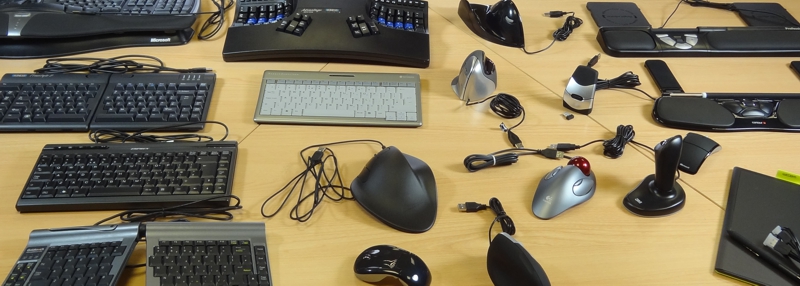
  • InputDevicesThe constant flow of new computer input devices seems to be unending. As Logitech, Microsoft, and now even Apple, introduce more products claiming better ergonomics benefits, new specialist designers and manufacturers continue to appear and several of these make claims negating the benefits claimed for other products! Again, the manufacturer’s marketing budget (rather than ergonomics benefits) often seems to be the driving force in the popularity of such products.
  • Workplace stress is very much more of a topic.  Since the economy changed in 2008, presenteeism has been come a real issue. We find there is a stress element to growing numbers of the musculo-skeletal issues we are asked to address and it is essential that these problems are addressed in a holistic manner.
  • The disparity between pro-active organisations and those who regard every personnel welfare issue as a cost to be minimised (or avoided) is probably larger than it ever was. Indeed, the dynamic, investing employers are becoming more and more sophisticated whilst others, especially in the current economic climate, slip further behind.

As I have started to think about this, it becomes clear that there is much more to say but this is more than enough for one article! I have made notes for at least two more pieces that will spin out of this. As usual, I make no claims to being comprehensive in my analysis and welcome comments, thoughts or constructive arguments!


WIIFM – What’s in it for me?

December 11, 2012

enthusiasmAt the recent National Ergonomics Conference and Exposition in Las Vegas, I spent a morning at Naz Dardashti’s seminar about the Psychology of Ergonomics Programme Implementation. The following day, Michael Melnik’s keynote presentation about Generating Enthusiasm & Influencing Positive Change drew on similar thinking.

Looking at workplace ergonomics from the American perspective provides interesting insights and, whilst the legislative landscape is very different, there are common themes.  I have explored the psycho-social issues for individuals elsewhere so it is logical to look at the psychology behind a corporate or departmental implementation. How do you get “buy in” from your people from the outset and how do you sustain it?

iPadWhiteImagine going into a room full of people and announcing that you are going to give each one of them an iPad – absolutely free and with no strings attached. Now imagine going into a room full of colleagues (or clients) and describing the new Ergonomics or Health & Safety initiative you are about to start. How will the responses compare? If they are much the same, please stop reading now and contact me: I would love to know what you are doing and how you do it!

If, on the other hand, the second response is less enthusiastic, here are some ideas that should help to increase enthusiasm and energise your programme.  Please remember, also, that I am always pleased to receive comments, ideas or criticisms to further the discussion.

The first issue is to address the two key sets of stakeholders: management and employees.  If you have management support, it’s easier to get employee involvement and this puts you on the right track. If there is no management support or managers are simply paying lip-service, you should probably be looking for another employer!  If, however, employees can see that the organisation’s management is actively supporting, encouraging and funding the initiative, you can get on with the next part of getting buy-in.

I am assuming you will also be involving key stakeholders in the development of the programme before roll-out so that those “at the coalface” have had the opportunity to shape it into something they can help deliver.

When explaining the proposed roll-out, don’t ask people what they think (a common approach). Instead, ask how they feel. This will help you understand their motivations and concerns. It will also help you identify whether or not they understand what you are planning to achieve and how you will go about it. Ensure the programme addresses 3 key responses:

  • Rational – does this change make sense to all the parties involved?
  • Emotional – does everyone recognise “what’s in it for me” if they help to deliver the planned changes?
  • Physical – what needs to happen in the working environment for the planned changes to take hold?

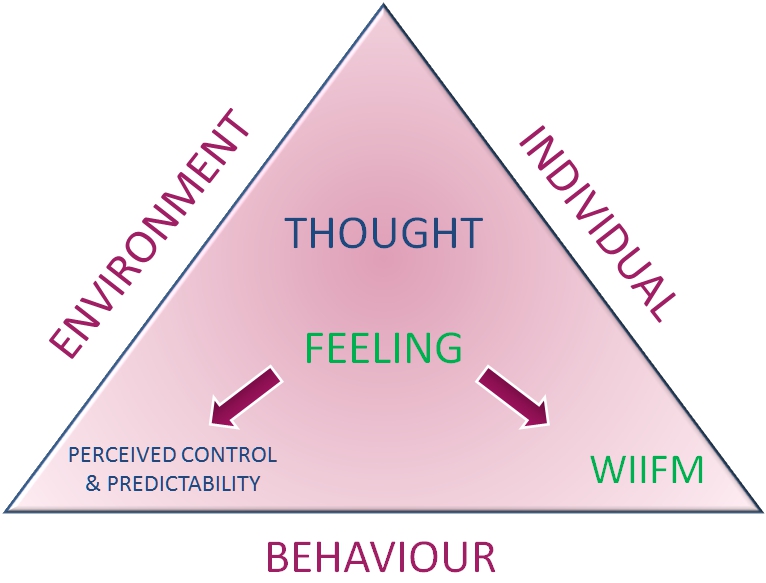
The WIIFM issue is key and must be answered in a multiplicity of ways. Individuals have different personal needs and expectations so be sure to justify and promote the programme on different levels. A single reason (e.g. a safer environment or greater productivity) will not suffice. Naz refers to Tony Robbins’ Six Basic Human Needs and Michael refers to his own Ten Energy Sources (Commitment, Communication, Consistency, Accountability, Inclusion, Respect, Recognition, Creativity, Flexibility & Fun).  Keep asking yourself the WIIFM question on behalf of the different stakeholders and making sure you have valid answers.

wiifm_graphicFind ways to engage with different individuals according to their own needs and preferred communication methods. Give them a sense of predictability and control, remembering always that, whatever the actual reality of the situation, their perceived reality is what is real to them.

Finally, when the programme introduces new equipment for users, ensure that it is easy to use and proper training is given!

This article skims the surface of some of the key ideas I have learned about this topic and I welcome further thoughts and contributions.


Ideas for the Future Office

November 12, 2012

Orgatec, the European workplace furniture show, has matured from an enormous market of products to a biennial event using these products to explore themes and concepts. As well as specific display areas covering subjects such as acoustics and lighting, many of the larger exhibitors demonstrated their own approaches to collaboration, productivity and connectivity. (Ironically, as exhibitors recognised the need for the “always on” office, the event organisers charged visitors €25 per day for Wi-Fi access!)

The ancient question of “how much space do you have and how many people do you want to put in it” has transformed into a complex and multi-disciplinary discussion. Furniture design is a key element in that discussion but psychology plays an ever-increasing role. As employers seek to improve the wellbeing of their personnel, office designers must now consider the psycho-social impacts of where, when and how people work. Lighting and colour become crucial factors in the design process and the provision of flexible areas for individual and collaborative work raises issues of confidentiality and acoustic comfort.

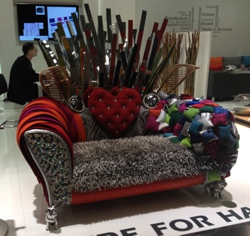
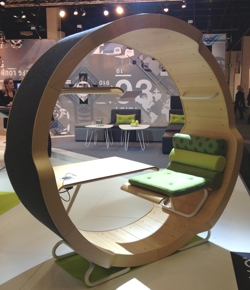
Acoustic pods have come of age with designs for offices-within-offices or individual “telephone boxes” as well as a plethora of high-back soft furnishing to create an impression of confidentiality.

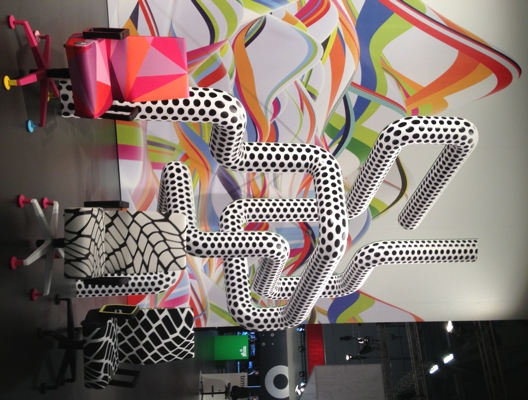
There are inevitable limitations to the simple business of providing office workers with a flat surface suspended above the floor but furniture designers and manufacturers continue, quite literally, to think inside and outside the box!


Corporate Team GB – Wellbeing Survey

November 12, 2012

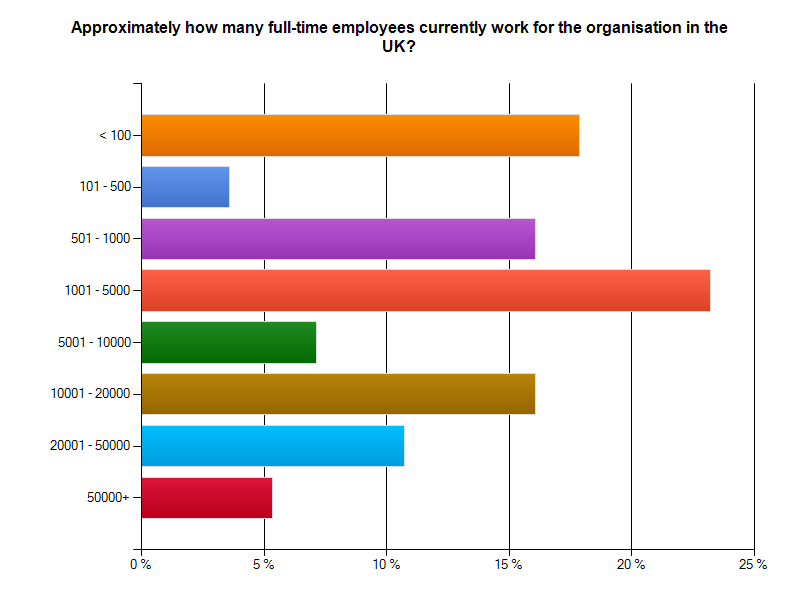
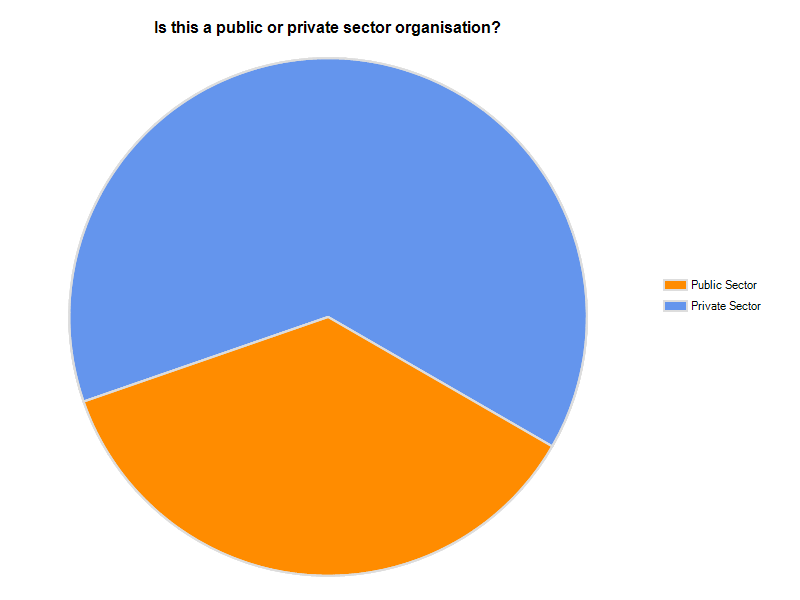
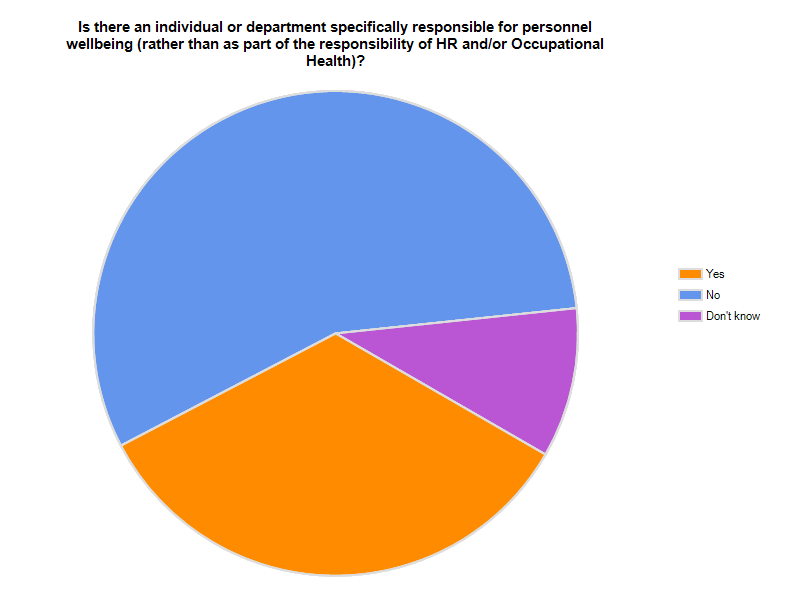
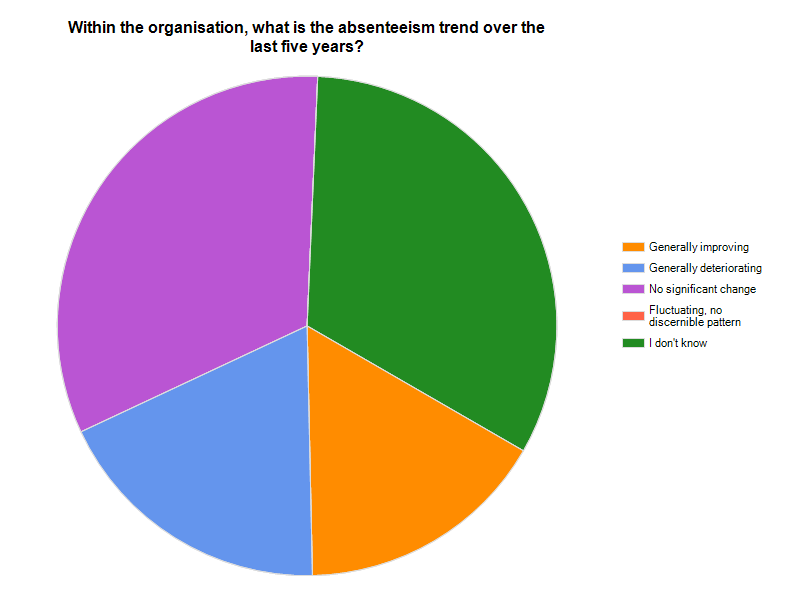
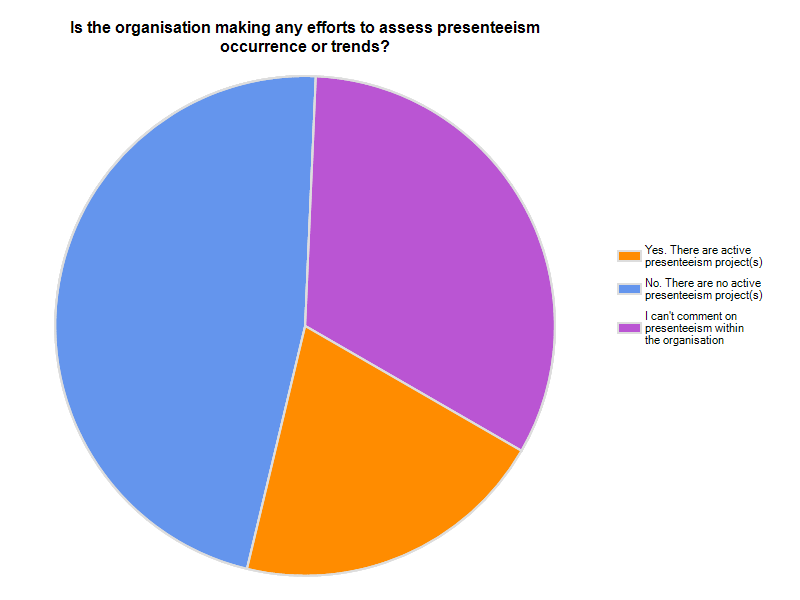
Here are the answers to the survey distributed through our October 2012 eBulletin.

Click on any chart to enlarge it.

There are some very positive indicators in the data provided above. However, many respondents showed strong signs of frustration and stress in their own roles when asked the question, “What is the one challenge that makes the biggest demands on your time and energy?”

Here is a cross-section of responses:

  • Providing a diverse group of people with information that will support their independent progression through different tasks. Then making sure the information is clearly understood and accessible at all levels of ability.
  • Not enough hours/resources, which leads to dropping proactive and just being reactive.
  • Ensuring statutory compliance against a history of poor management and decreasing budgets
  • Responding to procurement-driven Requests for Proposals from potential customers who are not familiar with the products/services they are purchasing.
  • Not having the money for equipment
  • Supporting people with mental health difficulties.
  • Communication with management who expect black and white answers in complex areas, who don’t appreciate the contribution Health and Safety can make to overall corporate objectives, who don’t want to listen and therefore isolate and bully those with messages they do not want to hear.
  • Encouraging active responsibility for one’s own health.  i.e. the importance of micro-pauses into the daily routine and avoiding short cuts in moving and handling.
  • Covering duties of absentees / unfilled vacancies
  • Increase in workload from various sources within the business due to lack of competent specialists within the business therefore H&S department are taking on new tasks which would typically be associated with other specialisms. Therefore increasing stress levels and pressure from management to work longer hours and weekends.
  • Managing expectations – I have only been at this Company for six months and the level of expectation regarding my support to assist them to manage their risks grows by the day! In terms of topics, driving at work, working at height, estate management (especially maintenance) and wearing PPE are the main ones.
  • Sustainability.
  • Compliance with UK and Corporate Company requirements with very few resources
  • Return to work programmes
  • Providing training as required
  • Keeping up with appointment after appointment.
  • Dealing with emails
  • Budgets and red tape
  • Convincing managers that it’s worth spending budget on Health, Safety, Wellbeing and Ergonomics
  • Endless amounts of Email
  • Display Screen Equipment health and well-being – supporting concerns, DSE Assessors, reviewing needs of furniture and ergonomic accessories, promoting DSE, seated posture best practice and importance of back care.
  • Getting clients back to work
  • Trying to follow-up, chase people to get projects completed.
  • Advice and support to managers and employees about pain, discomfort and access to suitable equipment
  • Being able to provide accurate data and relevant information to six functional directorates at one time
  • Developing the real understanding of ergonomics as something that benefits employees, management and the users of the products
  • Occupational health referrals, DSE and ergonomic assessments, stress assessments, reacting to incidents and accidents, building projects, asbestos management, fire safety
  • Externally imposed changes
  • VDU Risk Assessments
  • Communication of the problem and re-writing policies to pass another test!
  • Low morale, sickness, stress
  • Administration
  • Paperwork
  • Juggling multiple demands, increased workload, insufficient time or resource to accommodate all requests for assistance.