WIIFM – What’s in it for me?

December 11, 2012

enthusiasmAt the recent National Ergonomics Conference and Exposition in Las Vegas, I spent a morning at Naz Dardashti’s seminar about the Psychology of Ergonomics Programme Implementation. The following day, Michael Melnik’s keynote presentation about Generating Enthusiasm & Influencing Positive Change drew on similar thinking.

Looking at workplace ergonomics from the American perspective provides interesting insights and, whilst the legislative landscape is very different, there are common themes.  I have explored the psycho-social issues for individuals elsewhere so it is logical to look at the psychology behind a corporate or departmental implementation. How do you get “buy in” from your people from the outset and how do you sustain it?
iPadWhiteImagine going into a room full of people and announcing that you are going to give each one of them an iPad – absolutely free and with no strings attached. Now imagine going into a room full of colleagues (or clients) and describing the new Ergonomics or Health & Safety initiative you are about to start. How will the responses compare? If they are much the same, please stop reading now and contact me: I would love to know what you are doing and how you do it!

If, on the other hand, the second response is less enthusiastic, here are some ideas that should help to increase enthusiasm and energise your programme.  Please remember, also, that I am always pleased to receive comments, ideas or criticisms to further the discussion.

The first issue is to address the two key sets of stakeholders: management and employees.  If you have management support, it’s easier to get employee involvement and this puts you on the right track. If there is no management support or managers are simply paying lip-service, you should probably be looking for another employer!  If, however, employees can see that the organisation’s management is actively supporting, encouraging and funding the initiative, you can get on with the next part of getting buy-in.

I am assuming you will also be involving key stakeholders in the development of the programme before roll-out so that those “at the coalface” have had the opportunity to shape it into something they can help deliver.

When explaining the proposed roll-out, don’t ask people what they think (a common approach). Instead, ask how they feel. This will help you understand their motivations and concerns. It will also help you identify whether or not they understand what you are planning to achieve and how you will go about it. Ensure the programme addresses 3 key responses:

  • Rational – does this change make sense to all the parties involved?
  • Emotional – does everyone recognise “what’s in it for me” if they help to deliver the planned changes?
  • Physical – what needs to happen in the working environment for the planned changes to take hold?

The WIIFM issue is key and must be answered in a multiplicity of ways. Individuals have different personal needs and expectations so be sure to justify and promote the programme on different levels. A single reason (e.g. a safer environment or greater productivity) will not suffice. Naz refers to Tony Robbins’ Six Basic Human Needs and Michael refers to his own Ten Energy Sources (Commitment, Communication, Consistency, Accountability, Inclusion, Respect, Recognition, Creativity, Flexibility & Fun).  Keep asking yourself the WIIFM question on behalf of the different stakeholders and making sure you have valid answers.
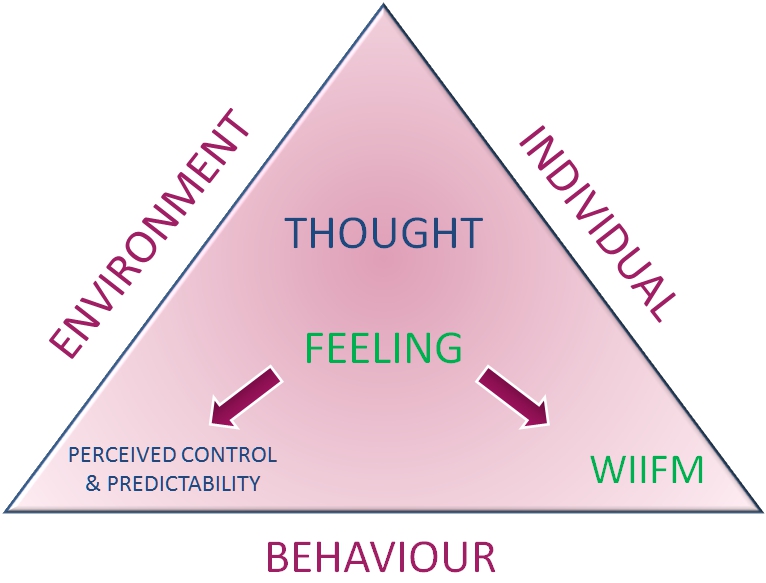
wiifm_graphicFind ways to engage with different individuals according to their own needs and preferred communication methods. Give them a sense of predictability and control, remembering always that, whatever the actual reality of the situation, their perceived reality is what is real to them.

Finally, when the programme introduces new equipment for users, ensure that it is easy to use and proper training is given!

This article skims the surface of some of the key ideas I have learned about this topic and I welcome further thoughts and contributions.


Closing a Building is the Beginning, not the End

July 30, 2012

There are many reasons for initiating a Smart Working project but one of the most common is the need to reduce real estate.  Defining the project, identifying appropriate personnel and job roles, establishing procedures, managing consultations and setting the roll-out agenda and timescale are all significant projects in their own right.

As a result, it is very easy to focus on closing buildings and “getting people out there” (whether that means home, hub or hot-desk working).  But what happens once they are “out there”?

It is quite possible that some (or all) of the original project team may be redeployed or disbanded at this stage – just when the real, long-term projects are beginning.  Whether the challenge is showing managers how to manage staff no longer under their constant supervision or showing those same staff how to manage themselves when they are not constantly supervised, there are new procedures to be created, resources to be provided and progress to be tracked.

It is also important to appreciate that problems arising out of failure to manage the new culture effectively may take some time to become evident (in much the same way that reduced absenteeism is almost certainly masking increased presenteeism in the current economy).

To ensure that Smart Workers are effective wherever they “touch down”, here are 10 simple rules.  They are by no means comprehensive but give a good overview and, for clarity, focus principally on computer users:

  1. Ensure they have proper health and safety training appropriate to their new environment.
  2. Ensure you provide clear guidance about appropriate behaviour.  Don’t take it for granted that common sense will prevail!  If they spill boiling water on themselves whilst making coffee in their own home during work hours, or trip over the cat whilst getting their laptop out of the car, or set up their workstation on the landing and roll their chair away from the desk and down the stairs, how can you minimise the likelihood of, and your liability exposure to, such events?
  3. Think about the physical ergonomics.  If they work at the kitchen table on a dining chair at the wrong height and use a laptop without a separate stand, keyboard and mouse, then musculo-skeletal problems are almost inevitable.  Back, neck or upper limb pain will, at the very least, inhibit productivity.  In the longer term, this may lead to absenteeism and, potentially, litigation.
  4. Provide guidance about posture.  Assuming the equipment makes good posture possible, personnel need to be trained to understand what good posture is, how to achieve it and why it is important.
  5. Carry out proper risk assessments. A home workstation will be very different from something provided in the office.  Use a DSE risk assessment that is specifically designed for home workers.  A computer-based version will be easiest to manage.
  6. Set up a mechanism to remind and prompt users to take breaks, step away from their desk, stretch and refocus.  This can be done through periodic email reminders, internal chat/social media tools or dedicated software such as CtrlWORK.
  7. If they spend a lot of time on the telephone, ensure they use a headset.
  8. Make sure that any equipment you provide is simple to use and obvious to set up.  If not, assume it won’t be used!
  9. Check regularly that individuals are coping.  Is the new way of working matching their work-life balance expectations? Are they managing the workload?  Are they feeling isolated?  Early recognition of problems and prompt interventions to address them are essential.
  10. Cut them some slack!  If they want to start work at 07:00am and then walk the dog for two hours at lunchtime, think seriously about whether the business can accommodate that and whether it will significantly increase both productivity and job satisfaction.

In one of my recent monthly eBulletins, I provided a list of the tools we offer to address all these issues.  More details here.  As always, I welcome comments, ideas and challenges !


If it’s not easy, they won’t use it!

July 4, 2012

I see lots of new products and many pre-production ideas.

I find that the problem with product designers making ergonomics claims is the conflict between a) the fact that ergonomics is such a holistic discipline; and b) the reality that many designers are focused on addressing one specific issue.  This may result in a design which is brilliant at addressing that one specific issue but ignores the others.

The effective application of ergonomics principles usually involves compromise. The real conundrum for the designer occurs when it becomes necessary to reduce functionality in order to improve usability. As I once said to a chair designer: “it doesn’t matter that this could fit 95% of users if 100% of users don’t understand how to adjust it”!

We see a regular flow of products with a sound concept and good execution but with a fundamental question about how people might use them unsupervised. Might they set it up wrong, fail to set it up at all or, worst of all, set it up in a way that might do them harm?

These experiences have all come to the fore recently in discussions about Smart Working.  If personnel are working unsupervised at home or in public places, what can be done to maximise the likelihood of them adopting good postures and using their tools and equipment properly?  Obviously, the first answer is good training and the second is finding tools to monitor and remind them (such as CtrlWORK, in the case of Windows computer users).

Alongside this, it is just as important to ensure their equipment is intuitive and as easy to use as possible. Laptop stands that look clever because of their sophisticated folding mechanism are not much good if users never bother to take them out of their smart leatherette slipcase. Equally, providing Bluetooth wireless keyboards or mice is a really good idea if, and only if, the Bluetooth connection is instant and consistently reliable. The same rationale applies to the intuitive use of chairs and monitor arms in hot desking areas.

The pressure on employers to offer BYOD schemes shows that many users are willing to provide their personal smart phones, laptops and tablets for use at work.  There’s a simple reason for this – they are easy to use!