Why do we WoW?

February 10, 2015

WoW LogoI have been thinking about the significance of clever marketing in the creation of a reputation.

The influence of the internet is now so overwhelming that a new product can power its way into the hearts and minds of consumers on the strength of search engine optimisation, Google AdSense and social media alone. However, the fact that ‘everybody’s talking about it’ does not necessarily mean a product is good!

As a vendor of products to improve workplace ergonomics, we have established a procedure to bypass any marketing or publicity bias and ensure our judgements are based on facts. This has been part of our ISO9001 quality system for many years and, although it may appear quite unsophisticated, it has proven itself many times. I have shared our procedure below and welcome comments and observations. At the moment, I believe the process to be unique in the industry but will be flattered (and encouraged!) by any who wish to adopt it.

We call it the ‘WoW Factor’ test. Every new product is reviewed by our WoW Factor committee and it works like this:

Ergonomics and quality are key.  The review committee consists of four people from the Customer Service team and four from Sales.  As well as different roles, it includes men and women of different statures and different psychometric profiles. This helps us to consider both physical ergonomics and human factors. Typically, the Customer Service personnel look at what sort of follow-up, technical questions, setup issues, etc. they might encounter and the sales team look at how attractive it will be to customers!

Each product is given 2 scores:

  1. Wow Factor – would I like one, do I “get it”, is it obvious what it’s for or how to use it?
  2. Usability Score – are the instructions good, is it easy to adjust, does it fulfil our ergonomics expectations, does it “do what it says on the tin”? (We also consider sales price at this stage).

WoW Factor ScoringTotal scores are not an absolute decider but they focus our attention on the key features and benefits as well as providing a basis for comparison to similar products. They also inform our discussion about whether or not the product is good enough to be part of our portfolio.


Orgatec and Beyond

November 5, 2014

Orgatec South EntranceVisiting a large, international exhibition is always an experience full of contrasts. On the one extreme are the companies making products that do not look much different from their range 20 years ago and on the other are the companies that have transformed their portfolio, even since the same exhibition last time.

There will always be a (surprisingly large) demand for cheap, unimaginative desks, chairs and associated furniture that add nothing to the job satisfaction, productivity or sense of worth of a worker.

There will also be a small but entertaining array of ‘designer’ products that seem to be a victory of style over substance. Perhaps it’s my age – or my aesthetic insentivity – but I always have a sense of ‘emperor’s new clothes’ about such highly priced, and often impractical, concepts.

Much more interesting to me are the designers and manufacturers whose products embrace all aspects of modern employment.

I have been involved in workplace ergonomics for over 20 years and there is no doubt that the pace of change has never been faster and the assault has never been more multi-faceted. Gone are the days of the first mesh-back chair or the first height-adjustable desk – or the first counter-balanced filing cabinet!

Today we must embrace agile working whilst considering wellbeing and engagement, accommodating BYOD, understanding the ‘always-on’ generation and not forgetting the ageing workforce and, for good measure, not being distracted by the news that ‘sitting kills us’!

What is most exciting is the evidence that many companies are producing products to address these demands. This does not, of course, mean that they necessarily understand them! Whilst some manufacturers innovate to create demand, most are happy to respond to a market need. For example, over 100 companies exhibited sit-stand desks at Orgatec but I suspect that only a handful have anything more than a primitive comprehension of the psycho-social and cultural impacts of introducing this type of working to an organisation.

technologyOn the other hand, some furniture manufacturers are introducing technologies to improve communication and collaboration, forging partnerships with software, hardware and telecoms companies to truly integrate our different ways of working.

This means that it is even more important for the consumer to understand the wide-ranging issues affecting today’s workplace by assembling a multi-disciplinary team to plan any move or reorganisation.  The days of ‘how many desks do we need and what colour are the chairs?’ are long gone!

But watch out – because the Internet of Things is coming fast and that is changing the landscape once again!


Implementing sit-stand desks – a strategic approach

October 31, 2014

sit-stand-comparedDespite the availability of modern sit-stand office desks for nearly 20 years, UK interest in them has grown significantly only in the last year or two. Whilst there are all sorts of scare stories being circulated, the simple truth is that there is genuine (and substantial) evidence that sedentary lifestyles that are now common amongst office workers can lead to Type 2 diabetes, other cardiovascular problems and obesity. Whilst it may seem immediately obvious that too much sitting (i.e. not enough exercise) might lead to obesity, this combination of likely outcomes represents a major cause for concern.

Assuming you have weighed up the evidence (this article provides several useful research links) and agree you need to take action, there are many ways to provide sitting and standing options for computer users. However, they all require careful management both in terms of implementation and subsequent use. In exactly the same way that a good chair will be wasted unless the user has been trained to adjust it and take advantage of its features, a sit-stand desk option will not benefit individuals fully unless they know when to use its different modes, how to do so and for how long.

Evidence from the United States, where employers have been quicker to respond to the research findings, suggests that a successful sit-stand implementation is far from a foregone conclusion. Without proper planning and preparation, any implementation runs the risk of misuse or, worse still, disuse.

UK employers are now considering a number of approaches, including installing 100% sit-stand in new projects, adding a proportion of sit-stand to a general office of sitting desks, providing stand-only tables for meetings and short-term use, adding adaptors to existing sitting desks and  incorporating a mix of options within an Activity Based Working (ABW) approach.

So what should employers be thinking about to ensure they don’t look back in a few years and think “what a waste of money”?

capisco-and-deskFirst, don’t be bullied into unplanned, knee-jerk action! Whether the pressure comes from an individual employee or an external third-party warning of dire consequences, you need to be clear about the decisions you make and their likely impact on your business.

Next, look at what work your people are doing. How do they work now? What activities would be done better standing? Or walking? If you have never explored the concept before, this is an excellent time to look at an ABW (activity based working) approach. Unless you are moving premises or carrying out a complete refit, full ABW will probably be too radical for your organisation but understanding the underlying concept will inform your decision making and allow you to consider the more distant future.

Then see what furniture and space you already have. Are there areas that would lend themselves to different ways of working? Could existing break-out areas be adapted? You probably have areas that have never really worked in their current format: might they achieve that elusive popularity if they were redeployed with sit-stand furniture? What about some sit-stand workstations at the end of each row of sitting desks? Or are there any desks that could be easily adapted to sit-stand? Sometimes such an adaptation requires hardware on top of the desk but it might be more effective to retain the desktop and simply replace the standard framework underneath it with a sit-stand mechanism. And don’t forget meeting tables: could some of these be standing versions instead?

sit-stand-exampleHaving thought about what might be done with the furniture, you need to think about the impact it will have on your people. How will it change how they communicate with one another? Will some people feel claustrophobic if others are standing over them? Will everyone have access? If you decide to start with a small number of units in a hot desk environment, will a minority ‘hog’ them and prevent others benefitting?

It may sound trivial but don’t forget the IT infrastructure. Make sure there are lots of extension cables available for mains, keyboards, mice and peripherals.

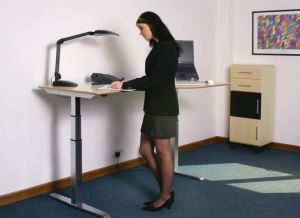
Finally – and probably most important, plan your training. Ensure people understand the benefits and know how to use the equipment. And that they know how to stand! Getting up from the chair has cardiovascular benefits but poor standing posture can create as many musculo-skeletal problems as poor sitting posture. Each individual needs to be able to set themselves up in standing-mode and know what ‘good posture’ feels like so that they can replicate it for themselves in the future.

Alongside all this, remember that there are many other ways to complement your sit-stand implementation. Use it to reinvigorate any established wellbeing activities and be aware that it should always be regarded as part (albeit a crucial part) of the bigger health, engagement and productivity landscape.


Quick Tips for Sit-Stand Desk Users

September 8, 2014
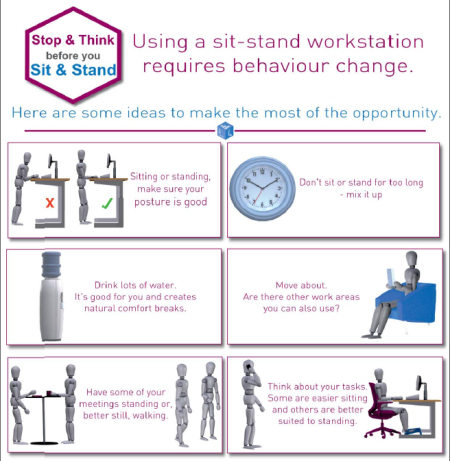
Stop & Think before you Sit & Stand

Stop & Think before you Sit & Stand – click for a downloadable pdf

We have been working with employers to identify behaviour change issues and training requirements related to the use of sit-stand desks in the office. Needs vary from organisation to organisation and this often depends as much on corporate culture as on physical workplace issues.

One common theme has been the need for a ‘quick tips’ list. Those of us embedded in these activities every day sometimes forget that the ‘blindingly obvious’ (to us) may not even be visible to the majority! The document therefore has to be something with a handful of ideas that are easily implemented and make sense to everyone, rather than just the ergonomics/health & safety team members.

The result is a one page, ‘6 ideas’ list that is deliberately simple. For a longer, more detailed list, see one of my previous blogs.

Customer responses to the document have been good but, as always, I welcome comments.


Sit-Stand Desks: What are my choices? (Part 2 of 2)

July 8, 2014

(Part 1 of this blog can be found here).

Sit-stand or sit-sit, electronic, gas-lift or crank – what are the options?

Sit-Stand-Desk-FramesHeight adjustment for true sit-stand desks is usually electronic.

There are also a few models with gas-strut-supported adjustability rather than an electric motor. These models have the advantage of not requiring electricity so they can be ideal for touch-down areas or some hot-desking environments. However, the gas-lift mechanism will be weight-sensitive so it is important to ensure the proper configuration when specifying.

By contrast, the majority of electronic sit-stand desks will have a weight limit comfortably above normal requirements (as long as sitting on the desk whilst raising it is not considered a “normal requirement”!). Electronic adjustment is therefore the norm for sit-stand.

Manual adjustment by crank handle is another option to be aware of. Whilst some crank-adjustable desks may be marketed as sit-stand (and offer suitable height range), the length of time (and effort) required to make the manual adjustment will quickly deter users from actually doing so. Crank-adjustable models (typically around 650mm – 850mm height range) are normally regarded as “sit-sit” products for use in hot desk environments and areas where users of different heights need to share sitting workstations.
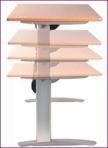
Sit-StandActuationThe EU standard height adjustability range to qualify as a sit-stand product is 650-1250mm. The (US) ANSI/BIFMA standard is 22 – 48 inches.

Whilst many employers will want to “go by the book” and only purchase products that meet the appropriate standard, these models require triple (or two stage) telescopic legs. Versions with only two element (single stage) legs are (inevitably) cheaper and will suit a high proportion of people. They are widely used in single installations for individuals with back problems, even though they do not meet a standard.

Adapting an existing sitting desk

Sit-Stand-AdaptorsA number of manufacturers have introduced products to convert a standard, sitting desk to something that can be used as a sit-stand workstation. These vary in complexity, usability and ugliness! Typically, they are either a device that sits on top of the desk or something that resembles a giant monitor arm. The choice of readily available models in the US is significantly wider than in Europe.

Where cost is the most compelling issue, many employers consider such adaptors instead of complete desks. However, our own experience is that some of these adaptors turn a perfectly-good sitting desk into a not-very-good sitting desk and a not-very-good standing desk! Some models provide good ergonomics in only one posture (sitting or standing) and a compromised setup in the other. Despite assessing many variants, the portfolio of such products that we actually sell is very small.

The monitor arm variant creates substantial leverage on the desk so a very sturdy work surface is essential. Another issue to consider is stability in the standing posture.  Finally, it is also important to remember that the US market uses keyboard trays extensively so users are better disposed to this type of arrangement than Europeans, who are used to operating their keyboard and mouse on the actual desk, rather than on an attachment.

One cost-effective solution without compromise is to use the top from an existing sitting desk and simply fit it to a height-adjustable frame. This not only saves money but also enables the replacement desk arrangement to blend better cosmetically with other furniture.

Treadmill & cycle desks

These are not actually sit-stand products but they have appeared in response to the health concerns already outlined in the first part of this blog. It is, therefore, probably appropriate to mention them in passing. However, I have already expressed my views on this topic so will not repeat myself.

What else should I be thinking about?

Saddle seats and perching stools

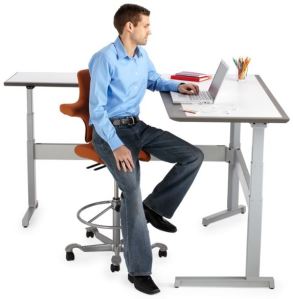
Sit-Stand-Stool-ExamplesA growing number of users are finding that saddle seats and perching stools can provide a good “half-way house” between traditional sitting and standing. However, this is a whole topic in itself and this blog series is probably already too long! If you wish to explore this concept, ensure you work with a supplier with a good understanding of sit-stand furniture and broad range of alternative seating products so that you can compare the different designs and features.

Product trials are essential since saddle seats, in particular, will elicit very different (and sometimes unpredictable) responses from your user population.

Beware of the doomsayers!

There is no doubt that we sit too much and we need to take action about it. Sit-stand desks are an excellent tool in our armoury of weapons to challenge bad behaviours. However, I have never believed in scaring people into making a purchase decision and, as I stated in Part 1 of this blog, a training and culture-change approach is as important as the equipment provided.

Rational debate, animated discussion and good ROI arguments are much better tactics. I have my doubts about whether this sort of infographic really helps the cause! Be careful also about sites that look like they represent a lobby group when you first see them but are in fact a marketing tool for a manufacturer. However valid and reliable the content, it is important to remember the context of the message.

Successful sit-stand workstation implementation & a healthier workplace

What does success look like?Finally, here is a selection of ideas for successful integration of your sit-stand desk implementation and a healthier workforce!

  • Train users to understand how to use the desk, when to make posture changes and what good posture feels like (sitting and standing)
  • Raise the desk up too high at the end of the day. It makes life easier for cleaners and forces you to reposition it in the morning.
  • Raise the desk when colleagues approach to talk to you and have your conversation standing up.
  • Stand for telephone conversations, especially those when you need to be assertive.
  • Stand to sort papers and files.
  • Install “poseur tables” for short standing meetings (gas-lift height-adjustable versions are available)
  • Have walking meetings.
  • Park as far away from the building as possible.
  • Wear a pedometer and track your steps. Compete with yourself to improve your average!
  • Use the stairs, not the lift (some organisations slow the lifts down to encourage stair use)
  • In established Hot Desking areas, install a pair of sit-stand desks at the end of each set of standard desks. This will work very well provided good policies and procedures are in place (and the Hot Desking facilities are properly implemented and managed).

Sit-Stand Desks: What’s all the fuss about? And why now? (Part 1 of 2)

July 7, 2014

(Part 2 of this blog is available here)

Are sit-stand desks new?

SitStandDeskEarly20thCenturyThere is evidence of implementations dating back over a century, but height-adjustable sit-stand desks as we now know them have been available from Scandinavian manufacturers for about 20 years. We have been using electronically-adjustable models throughout our office for over 10 years.

More recently, products manufactured in the Far East (but often marketed as Scandinavian or European designs) have brought the price down significantly. In 2000, a Danish-manufactured 1600mm x 800mm (63 x 31.5 inch) sit-stand desk retailed at £1200 + VAT. Today the UK retail price (before discounts) is less than £700 + VAT. There are also after-market adaptors for existing sitting desks (see Part 2 of this blog).

So is “getting up” a new thing?

Dynamic sitting, movement and changes of posture have been a mantra since before the birth of ergonomics as a discipline. However, the “sitting is bad for you” message is quite recent (but probably not as recent as people think).

The “Sitting Disease”

Type 2 DiabetesAs long ago as November 2007, the Daily Mail published this article in the UK headed “Sitting at a desk all day is as bad for health as smoking”. There were probably many similar articles at the time.

The basis of the research (from the University of Missouri-Columbia) was that prolonged sitting increased the likelihood of heart disease, Type 2 diabetes and obesity. These outcomes drew the parallel with smoking (also a cause of these three disabling conditions) and this prompted the “sitting is the new smoking” catchphrase.

Recent publicity, in the UK especially, comes as a result of a Leicester study providing a meta-analysis of 18 studies and published in August 2012. This arrived at a similar conclusion.

Alongside this research, other evidence suggested that even regular exercise or gym workouts would be insufficient to counteract the damage being done by sedentary lifestyles amongst western office workers.

As a result of the publicity surrounding these findings, the catalogue of potential health woes apparently brought about by a sedentary lifestyle have been collectively dubbed the Sitting Disease.

Seeing the wood for the trees

There is no doubt that, properly implemented and used, sit-stand desks are healthy and beneficial to employees. They can increase calorie consumption, encourage movement, reduce sedentary postures and increase productivity.

But they may not!

Much of the recent purchase activity of sit-stand desks has been as a knee-jerk reaction to employee demand. In the US in particular, many retrofit sit-stand desk projects have proved harder to implement than expected. Blue chip employers are now installing successful sit-stand-only desking in new build projects but this is a very different situation from partial implementations in existing facilities.

Culture and training

In the same way that a well-designed chair will not help back problems unless the user is trained to set it up and adjust it, a sit-stand desk may just replace poor sitting postures with poor standing postures. It is also essential that users recognise the importance of mixing activities and remember not to stand or sit for too long at any one time. Taking the chair away and standing all day may solve some problems but will almost certainly create others.

It is therefore important to find a desk supplier who understands the cultural and psycho-social issues of using these products, rather than a retailer who can simply assemble it and plug it in.  It is also naïve to assume that the simple act of providing users with sit-stand desks will be the panacea for all posture issues, instantly eradicating the “Sitting Disease” and increasing productivity!

Users need to understand how to adjust the desk, why they should be doing so, how long they should use the different postures and what “a good set-up” looks and feels like. Otherwise there is a strong chance that the varied use will be abandoned and it will soon revert to an unnecessarily expensive sitting desk.

It is even possible to link the desk controls to the user’s computer and adopt a scientific approach to posture change. For example, SitStandCOACH is a software/hardware combination that prompts users to change posture at appropriate intervals (linked to activity and not just to time).

So what are my options?
What are my options?My next blog will explore product options and provide ideas for implementation, as well as offering some warnings about pitfalls. In the meantime, in no particular order, here are several research links relating to sit-stand workstations. I shall leave you to draw your own conclusions about the veracity of each item!

  • Useful blog article with several research links – http://53eig.ht/1oRyine
  • University of Leicester, 2012: Sitting for protracted periods increases the risk of diabetes, heart disease and death – http://bit.ly/1kcwSAs
  • Ebara et al, 2008: Effects of adjustable sit-stand VDT workstations on workers’ musculoskeletal discomfort, alertness and performance – http://1.usa.gov/1kcEH9l
  • University of Sydney/National Heart Foundation of Australia Case Study, 2013: Do sit-stand workstations reduce employees’ sitting time – http://bit.ly/1kcGZp7  (further references in the back of this publication)
  • Choi, 2010: Ergonomic Evaluation of Electrically Adjustable Table in VDU Work – http://bit.ly/1kcKEDd
  • Grunseit et al, 2013: “Thinking on your feet”: A qualitative evaluation of sit-stand desks in an Australian workplace – http://bit.ly/1kcLGz8
  • Hedge, 2004: Effects of an electrically height-adjustable work surface on self-assessed musculo-skeletal discomfort and productivity in computer workers – http://bit.ly/1kcJlEs
  • American Institute for Cancer Research, 2011: Getting Up From Your Desk Can Put the “Breaks” on Cancer – http://bit.ly/1kcxoOY
  • Extensive BBC Article, April 2014: http://bbc.in/1kcxFS6

(Part 2 of this blog is available here)


How do I choose an office chair (for myself)?

January 8, 2014

When I see the question “what is the best office chair?” online, I just want to shout “wrong question” at my screen. Unfortunately, such rants are no help to anybody so this article a) raises a better question (in the title) and b) goes some way towards answering that question.

Many people outside (and within!) the office furniture industry grossly underestimate the importance of the work chair. Numerous articles  have warned us about the perils of too much sitting but the truth is that many of us still have to sit at a desk whether or not that is our preferred mode of work. Even with frequent breaks, it is essential to optimise our comfort and posture by ensuring the chair(s) we use regularly are well chosen.

ChairDetail1It is obviously not enough to go to your nearest office superstore and buy the first chair that says it’s “ergonomic” on the box. The fact that the chair (or packaging) manufacturer can spell the word is no guarantee they know what it means.

So here is an action plan for buying a work chair for your personal use. If you are looking to purchase for a department or organisation, then understanding this process will certainly assist you but the specifics of bulk purchase (“How do I choose an office chair for lots of people?”) will be addressed in a separate blog.

Assuming you are willing to commit the time and energy to “do this right”, I hope this plan will help you. If you don’t have the time to follow this process, the alternative is to find a good supplier(!) who has a real understanding of ergonomics and can help arrive at the best decision.

  1. First you need to understand what is “out there” and gain some understanding of the furniture industry terminology. This will ensure you are moving towards what is best for you rather than what is best for the chair salesman. To assist, you will need a list of chair features, what they do and what benefits they offer. This list is a good example.
  2. ChairDetail2Such a list will not give you all the answers. It may even raise more questions but they will be useful questions that will ensure an informed choice in due course. From the list, create a shortlist of a) essential and b) desirable (but not essential) features along with any questions that you need to ask in order to add or eliminate a feature.
  3. Now start looking for a supplier. Unfortunately, “ergonomic” is one of the most over-used, abused and misused words since the invention of Google so you have to be a little imaginative with your online searching. Try using specialist office chairs, for example, but read more than the link line of each search result. This will start to give you a feeling for the businesses available. Don’t be deterred if the business(es) that look most promising are not in your geographical area: they may well be willing to travel and, if not, will probably recommend a reputable supplier closer to you (the dedicated workplace ergonomics community is quite small and genuine specialists will be surprisingly willing to refer you to someone they trust rather than let you down).
  4. ChairDetail3aAsk your questions – this will inevitably generate further questions. The answers will help you decide if this a supplier you are comfortable with (this purchase is an important decision). Get the names of chair models that meet your criteria and ask for web links to the products. Viewing online will be better than using a catalogue because the best companies often use video on their web sites. Here are some other questions to ask prospective suppliers:
    – do you offer an installation service?
    – if so, does it include user training?
    – if so, what does the training involve?
    – do you offer a Sale or Return (or similar) trial period?
    – if so, how long is that?
    – what training do your installer(s) have?
  5. By this time, it is desirable to have decided on a preferred supplier.  You will be counting on their advice so it must be someone you feel you can trust.
  6. You also now have an idea of the sort of chairs that meet your feature requirements, so you need to check they will also fit you dimensionally. The best way to ensure the optimum physical match is take your measurements. All good suppliers will be able to offer you a form for this, either as an emailed pdf or an online version like this one.
  7. ChairDetail5With your chosen feature set and the anthropometric data (measurements) recorded on the form, your preferred supplier will now be able to provide you with specific model recommendations and you can start talking about price.
  8. To ensure you stay within budget, you will need to review whether or not you want to keep all the desirable (non-essential) features.
  9. You now have a chair shortlist so you will need to sit on at least one chair, possibly two or three. This may involve someone coming to see you or the supplier may have a showroom. A good supplier will probably suggest one chair with firm foam and one with soft or perhaps one chair with a lumbar support and one with a pelvic support so that you can compare and contrast the different feel. I would advise against trying more than 3 chairs because it can become very confusing.
  10. By now you should be able to make your decision. To be confident about the process, double-check that your new chair can be supplied on Sale or Return or there is some trial period option.
  11. Finally, ensure that someone delivers the chair, shows you how to set it up and trains you properly in its use. This process will probably take 30-60 minutes. Ensure you are shown, not just what the knobs and levers do, but why you would want to use them and what you need to achieve. You should also be given chair instructions and posture information for reference in the future. Many chairs now have animated instructions available online and an animated Posture Guide (for European set-ups) can be found here.

ChairDetail4As I said at the outset, many people underestimate the importance of the work chair and, as a result, the importance of the selection process. I hope this article demonstrates how not to underestimate it!

Do you agree with my action plan? Have I missed anything out? Do you have a (really reliable) simpler process?

Do you have the time to follow it? If not, contact one of my colleagues for assistance!

If you are also interested in how to choose an office chair for lots of people, my blog ‘Choosing Office Chairs (for the Majority)‘ provides a suggested procedure and more information is also available at seatingexperts.uk.


Office Chair Features & Benefits

January 7, 2014

Features & BenefitsI have been thinking about the best way for an individual to choose the optimum office chair and it occurs to me that it would be a good idea to start with a list of the features and benefits that are available in today’s products. I have therefore pulled together the contents of various documents we have been using for some years, then updated and consolidated them to create this list. I am sure there may be a few features I have omitted and many chair manufacturers will have their own claim to uniqueness but I think this gives a reasonable overview.

Please take a look at the list and comment, applaud or criticise it here. I shall be delighted to update or amend it in response to feedback.

To understand how to use this information, “How do I choose an office chair (for myself)?” provides a detailed action plan.


What is the best office chair?

January 6, 2014

Invisible ChairI see this question crop up from time to time in blogs and LinkedIn postings. If you are thinking about ergonomics considerations, the first response is (as usual) “it depends”.

My next observation is that anyone responding by naming a specific product is either unqualified to answer or should know better. Some might add a third category of respondent, the office chair salesman, but I would contest that they are, too often, in one or both of the first two categories!

I often draw parallels between the workplace and driving scenarios, since so many adults are drivers. Would you ask someone what is the best car? If so, you would certainly expect a barrage of further questions: What is your budget? How many seats do you need? Are you the only person to be considered or do you have family requirements? Is image important? Fuel economy? The list goes on.

Choosing a chair is a similar process so I would recommend rephrasing the question to “How do I choose an office chair? (Or study chair, or laboratory chair, or control room chair, etc.). I would then subdivide my answer again into choosing a chair for yourself and choosing a chair for your team, department or organisation.

… but that will need a few more blogs!

How do I choose an office chair (for myself)?” provides a detailed action plan.


What Can Psychometrics Teach Us about Sitting Behaviour?

August 30, 2013

Earlier this month, I was in the Netherlands visiting some of our key partners. As always, there were some interesting conversations and I gained intriguing insights into new product developments and concepts. Amongst the many topics we explored, there was one particular comment that triggered a fascinating discussion and I have been thinking about its possible significance.

The conversation was about developments relating to the BMA Smart Chair, which I have blogged about elsewhere. The technology provides data about sitting behaviour, chair use and user habits. Sensors in the chair monitor how the user is sitting and, as well as buzzing to prompt the user to change poor postures, they also record posture data.

The latest development, Smart Cloud, polls user data from each chair at 15 minute intervals giving almost-real-time statistics about how the chair is being used.

BrainCogsA chance comment from one of the project team triggered my lateral thinking – and this blog!  He said that they were starting to anticipate sitting behaviour according to the character of the individual.  All users are trained to set up and use the chair before recording begins but “people in accounts”, for example, tend to follow the training and sit (and move) well, whilst “sales people” adopt all sorts of postures. For the purposes of this article, I have simplified the comments but let us assume for a moment that character types really do point us to sitting behaviour.  We can then see where that hypothesis might take us.

For nearly ten years, we have worked with The Colour Works to develop our recruitment, teamwork and customer relationships by understanding how different individuals think, behave and interact. As a result, I have a lot of experience, albeit on an unqualified level, of some of Carl Jung’s psychology concepts and behavioural dynamics. I know, for example, that different character types respond differently to particular types of communication.

terrible_posture_laptop

Not one of our customers!

Following this thinking, we could use a psychometric assessment to identify the character types of chair users (and my guess is that this would not need to be too in-depth or sophisticated). With the data created, we could then tailor the posture training to suit not only their learning style and attitude but also their likely sitting behaviour. It is still just a hunch at the moment, but I believe this could be really significant.

I am now planning some practical case-study research into how this thinking could be optimised and used.  In the meantime, I would love to hear from anyone who knows of any previous work in this area or who agrees (or disagrees!) strongly with my thinking so far.